


RentCafe Resident
4.823.65K Reviews
App Specs
- Version
- 26.8.0
- Updated On
- License
- Free
- Downloads
- 1,000,000+
- Developer
- Yardi Systems
- Categories
- Lifestyle
- Platform
- Android, iOS
Screenshots
 Analysis by AppCompare
When rent, repairs and property messages all land in different places, even simple household admin can become a chore. I find RentCafe Resident most useful as a central place to handle the tasks a participating rental community makes available, rather than as a replacement for every conversation or document connected with a home. It is a free lifestyle app from Yardi Systems, and its appeal is practical: open it when you need to take care of a resident task, then get back to your day.
A repeatable routine for rent and repairs
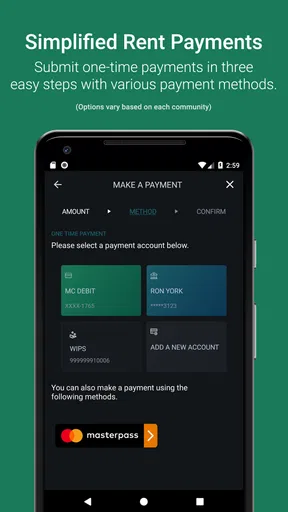
The most dependable way to use a resident portal is to build it into routines you already have. I would check the app when reviewing household bills, confirm the rent amount and payment details shown for my account, and complete the payment with enough time to catch any issue before a deadline. Afterward, I would keep the confirmation available in the app or wherever I normally store important records. That small habit is more useful than relying on memory or assuming a payment went through because I tapped a button.
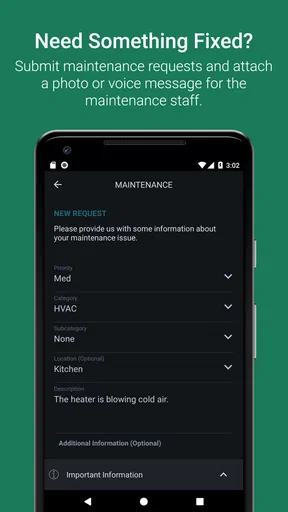
For a repair, I would submit the request while the problem is easy to describe. A concise note should say what is happening, where it is happening, and whether the issue is continuing or intermittent. If the app offers a way to attach photos in the relevant workflow, a clear image can help explain a visible problem; I would still include words, since a picture may not show when or how the fault occurs. Then I would check for a response through the communication options available to my community, rather than sending the same request repeatedly and making the history harder to follow.
This makes the app particularly suitable for residents who want fewer scattered tasks and are comfortable managing routine matters on a phone. It is less compelling for someone who prefers to handle every payment in person, wants a standalone budgeting tool, or needs a detailed home-maintenance tracker unrelated to their rental provider. The app’s usefulness depends on having a property community that supports the services you want to use.
Check the account and notification choices
Before making the app part of a routine, I would review the account details and notification preferences available to me. A resident app is only helpful when messages reach the right person and the account corresponds to the right home. If more than one person in a household handles rent or repairs, it is worth agreeing who will submit requests and who will watch for replies, so two people do not accidentally duplicate the same task.
Notifications are best treated as reminders, not as the only record of something important. I would allow the alerts that help me notice time-sensitive account or property messages, while avoiding a setup that makes every update blend into a stream of phone noise. If I change notification settings, I would also make a habit of opening the app directly now and then; a quiet phone should not be mistaken for proof that nothing needs attention.
People often want to know whether they can use one login for multiple homes or manage a household together. The experience can depend on how a property is configured and which resident options are enabled, so I would check the account and property choices shown after signing in instead of assuming that every community works identically. That is a sensible limitation of a platform built around different properties: the app is a common doorway, but the available tasks can vary by community.
Worth Reading Before You Choose

EA SPORTS FC Mobile 26 Is a Bigger Football Game, but It Takes Time

Flipboard Shows What News Apps Must Do Beyond the Feed

Switching to Android Auto Means Rethinking Your Driving Routine

Google Calendar Makes a Crowded Week Easier to Manage

Ludo King Makes the Most of the Minutes Between Plans

Baby Panda World Brings Quick Play to Modern Phones, but Its Game Library Feels Busy
Making Resident Tasks Easier to Manage
I find the best way to make a resident portal useful is to decide what belongs there before a deadline or repair comes up. In this section, I’d focus on a small routine: check the account, handle one task at a time, and keep a record of what you submitted. That approach makes the app easier to rely on without assuming every property offers the same options.
First Impressions and Navigation
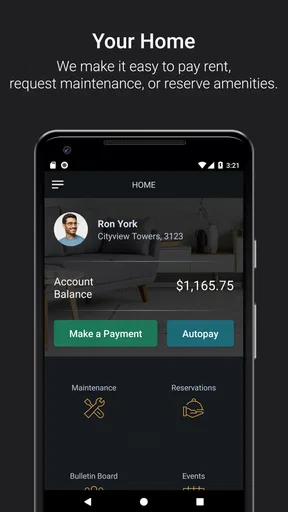
So, I decided to give RentCafe Resident a spin. Right off the bat, the app’s interface is super clean and intuitive. You know how some apps have so many features that they end up feeling cluttered? Not this one. Everything is neatly organized, making navigation a breeze. I was able to find everything I needed without having to fumble around, which is a win in my book.
Key Features That Stand Out
One of the standout features is the ability to pay rent directly through the app. Gone are the days of writing checks or dealing with clunky online portals. With just a few taps, your rent is paid, and you can get back to binge-watching your favorite series. Talk about convenience!
Another feature I found super handy was the maintenance request option. If something breaks in your apartment, you can easily submit a request, complete with photos and descriptions. No more waiting on hold or trying to explain the issue over the phone. Just snap, type, and send.
Community and Communication
Now, let’s talk about community features. The app allows you to connect with your apartment community effortlessly. Whether it's receiving updates about community events or important notifications, you're always in the loop. Plus, there’s a messaging feature that lets you communicate with property management directly. This is perfect for those quick questions that pop up now and then.
A realistic example is a weekday morning when I notice a leak beneath the kitchen sink just before heading out. I can record the location and what I observed while it is fresh in my mind, then submit the request through the available maintenance workflow instead of waiting until I get home and forgetting a detail. If I later receive a message from management, keeping the conversation in the app makes it easier to connect the reply with the original issue. For urgent danger, though, I would use the appropriate emergency contact route rather than assume an app message is monitored immediately.
That distinction matters: convenient messaging is not the same as an emergency service or a guarantee of instant response. I would use it for ordinary questions, updates, and repair follow-up, and use the property’s designated urgent contact method when a situation cannot wait. If a request seems stalled, a calm follow-up with the original context is more useful than opening several separate threads.
Personalization and Customization
One thing I absolutely loved is how RentCafe Resident lets you customize your experience. You can set preferences for notifications, decide how you want to receive updates, and even manage multiple properties if you're renting more than one space. It’s like having a personalized dashboard that adapts to your lifestyle.
For faster use, I would keep the routine simple: open the app for the task at hand, finish the payment or request, and then make a brief check for any related message before closing it. That reduces the chance of treating a submitted maintenance form as the end of the process when management may need more information. I would also avoid putting a sensitive detail in a casual message unless it is needed to resolve the issue; clear, relevant descriptions are usually easier for staff to act on.
Compared with a property’s ordinary web portal, a phone app can be more convenient when a task comes to mind away from a desk, especially when noting a repair or checking a message. Compared with calling the office, it gives residents a written trail for routine requests, but it may feel slower if the question is complicated and needs a back-and-forth conversation. I see the best approach as using the app for trackable everyday tasks and switching to a direct conversation when nuance or urgency matters.
Security and Reliability
Security is a big deal for any app, especially when it involves financial transactions. The developers have clearly put a lot of thought into this aspect. The app uses top-notch encryption to keep your data safe, which gave me peace of mind. Plus, the app is reliable. I never experienced any crashes or bugs, which can be a deal-breaker for many users.
Because rent payments involve account and financial information, I would use a screen lock on my phone, avoid signing in on a shared device, and make sure I know how to reach the property’s usual support channel if the app is unavailable. These are sensible habits for any resident portal, not a claim that an app alone removes every risk. If a payment screen or account detail does not look right, I would pause and verify the information through a trusted property contact rather than submitting it in a hurry.
Where it fits, and where it does not
The app has a strong user following, with a 4.7 average from around 163,000 ratings and more than a million installs. It is free, rated for Everyone, and its current version is 26.4.0; it has been available since December 26, 2013, with Android support starting at version 8.0. Those details make it easy to consider, but they do not guarantee that every feature is active for every resident. I would first check whether my property uses RentCafe and whether the tasks I care about appear in my account.
For a resident whose community supports rent payments, maintenance requests, and management communication in the app, that concentration can replace a patchwork of reminders, phone calls, and a browser portal for everyday needs. But it is not a general rental search service, a personal finance planner, or a substitute for reading a lease and keeping copies of important documents. Someone who needs those broader tools should keep using the appropriate dedicated service alongside the resident app.
Yardi Systems has made a familiar kind of rental admin accessible from a phone, and I can see the value most clearly when I use it consistently rather than only after something goes wrong. The trade-off is that the property community shapes what is available, and urgent or complicated matters may still call for direct contact. I would recommend trying it if your building supports it and you want a practical home for routine resident tasks.
Final Thoughts
All in all, RentCafe Resident is a stellar app for anyone looking to simplify their renting experience. It’s packed with features that cater to modern renters, making life just a little bit easier. Whether it's paying rent, managing maintenance requests, or staying connected with your community, this app has got you covered.
If you’re tired of juggling multiple platforms to manage your rental needs, give RentCafe Resident a try. It might just become your new best friend in the world of renting. Happy renting!
Pros
- User-friendly interface for easy navigation.
- Real-time updates on maintenance requests.
- Secure payment options within the app.
- Access to community events and notices.
- Quick communication with property management.
Cons
- Limited customization options for notifications.
- Occasional lag during peak usage times.
- Not all properties offer full app features.
- Requires stable internet for optimal performance.
- Some users report rare login issues.
FAQs for RentCafe Resident
What features does RentCafe Resident offer for managing my rental property?
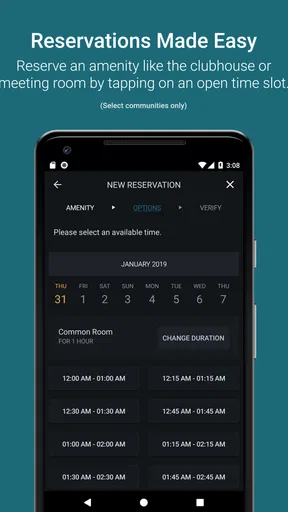
RentCafe Resident provides a comprehensive suite of features to streamline property management. Users can pay rent online, submit maintenance requests, and communicate directly with property managers. Additionally, the app offers a community bulletin board and event calendar, enhancing the resident experience by fostering community engagement and keeping everyone informed.
Is RentCafe Resident secure for online transactions?
Yes, RentCafe Resident prioritizes user security, especially for financial transactions. The app employs advanced encryption technologies to protect your personal and financial information. Regular updates and security checks ensure that your data remains safe from unauthorized access, providing peace of mind when paying rent or managing financial details.
Can I access RentCafe Resident on multiple devices?
Absolutely, RentCafe Resident is accessible on both Android and iOS platforms, allowing you to manage your rental details on various devices. Whether you’re using a smartphone, tablet, or computer, your account synchronizes across all devices, ensuring seamless access to important information anytime, anywhere.
How do I troubleshoot common issues with RentCafe Resident?
For common issues, RentCafe Resident offers a robust help center with FAQs, troubleshooting guides, and customer support. Users can also reset the app, clear cache, or reinstall it to resolve minor glitches. If problems persist, contacting their support team via email or phone ensures personalized assistance.
Does RentCafe Resident support multiple languages?
RentCafe Resident currently supports multiple languages, making it more accessible to a diverse user base. The app settings allow you to switch languages easily, ensuring that non-English speakers can navigate and utilize its features efficiently, enhancing user experience across different linguistic backgrounds.


